it now saves (mostly)
sorry for taking like 900 months to patch please forgive me
something in the works although i might not post it, more of an experiment to test Haxe
Currently working on my next game, learning a lot of things along the way. Taking a lot longer than I thought it would, so expect nothing in the coming months. pfp by @FullOnWave
ima dude, dude
Unemployed
Highland High School
Former british land
Joined on 1/13/24
Posted by Minix07 - March 24th, 2026
The last time I posted anything on here was an update on Newgrounds sim back in October. I had my birthday 16 days later and 173 days later I posted Newgrounds Sim in a rather rougher state then I would have liked. I set a goal at the start of spring break that I wanted to get it out before I was back at school. I released it the night before school starts.
I've release v1.0.1 that should fix the problem of it freezing on the reporting reviews. The saving is something that I have no idea how to fix (I did put a popup that should appear if it fails to) and I believe is an issue with Ruffle (if not then I'm pretty disappointed in myself for somehow messing up a one line function)
I'm glad I was able to capture the addicting feeling I was getting when I first played Newgrounds Sim. And was shocked that It got to the frontpage the next day and then a daily first!
As always, PM any issues you have with as much detail as possible and if possible a screenshot of your console during the event. I want to make sure Newgrounds Simulator is as best as it possibly can be.
Posted by Minix07 - October 2nd, 2025
I know I've been almost dead silent for about 3 months (school n stuff). But since since the website got a little update, I want to show what I've done so far since a lot has changed and also *why I HATE TOM

As you can tell from the original teaser, a lot has been added and changed (also, the bg and characters changes every time you open IE)
And finally: The user page (ignore 99999K placeholders)

Pretty basic but you can customize it whatever you want. (Ignore the shitty ass drawings i made in 5 min)
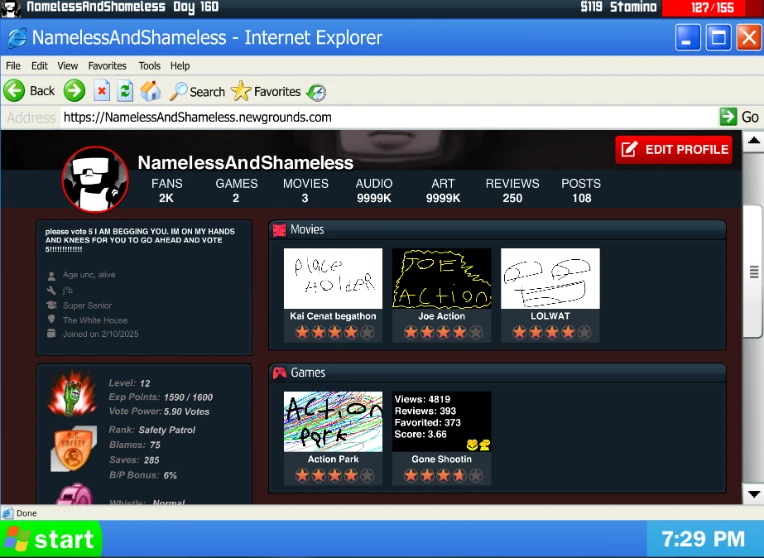
Also added levels, B/P rank, whistle and even awards.
One thing I was working on was the supporter shapes which was almost done, it just needed to add color and code, and then THEY DROP LIKE 20 NEW FUCKING SHAPES THAT I HAVE TO ADD NOW!!!!

*In all seriousness, this update is pretty cool and I like the Halloween theme. Also, thank you for adding the ability to select specify one news post and also in general, actually giving more then a damn about the community. You're the GOAT.
Posted by Minix07 - June 29th, 2025
What is goodie gangalang,
I'm here to show you how to create a simple click-and-point game using ActionScript 3.0, as I’ve never seen this talked about in AS3. If you have any questions, please leave a comment.
You need Flash that supports ActionScript 3.0. If the program starts with "Adobe," you can write ActionScript 3.0.
This tutorial assumes you already know the basics of Flash: where the tools are and how to use the features to create a piece of animation. Otherwise, I recommend watching the legendary Alan Becker's tutorial on the basics, as he does a much better job of showing you than I can. While it is a bit old, I still recommend watching it. You don't have to watch all of them, just the ones that go over the flash tools and features. This tutorial also assumes you know very little about ActionScript in general.
Unfortunately, I ran into a picture limit, so each step has its post.
Steps 2 & 3. Buttons 'n' Cutscene
Posted by Minix07 - June 29th, 2025
Inside the root, make a layer and place it at the very top. Make your mouse there and make it a MovieClip with an instance name. Make a layer for the code and give the mouse an EventListener for when it enters the frame. This way, the code is activated every frame.
this.curmc.addEventListener(Event.ENTER_FRAME, custommouse);

function custommouse(event: Event): void {

}
To make the mouse follow the real mouse, set its x and y to the same as the real mouse.
this.curmc.addEventListener(Event.ENTER_FRAME, custommouse);

function custommouse(event: Event): void {
	this.curmc.x = stage.mouseX;
	this.curmc.y = stage.mouseY;
}
But the real mouse is still showing, so that needs to be hidden.
this.curmc.addEventListener(Event.ENTER_FRAME, custommouse);

function custommouse(event: Event): void {
	Mouse.hide();
	this.curmc.x = stage.mouseX;
	this.curmc.y = stage.mouseY;
}
Now it seems to work; however, you can’t click on anything. This can be fixed by typing these two lines.
this.curmc.mouseEnabled = false;
this.curmc.mouseChildren = false;
Now buttons work with a custom mouse.
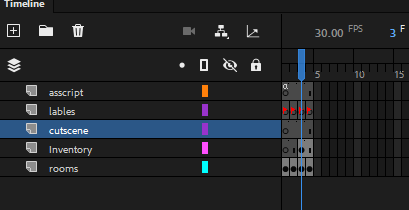
Inside the game movieclip, make a new layer for the animation
(If you want the cutscene to cover the inventory, place the layer above it; otherwise, below the inventory)
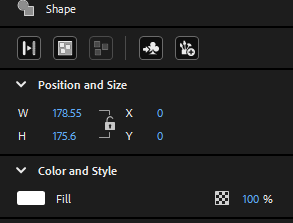
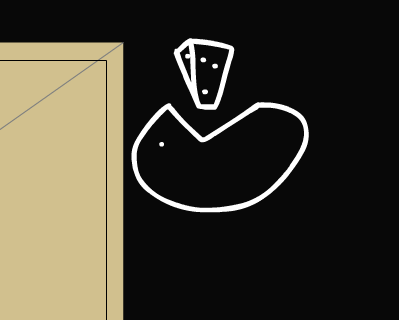
Draw something so you can easily identify what the cutscene is, and make sure its X and Y are set to 0.
Convert it into a MovieClip symbol. Inside it, move the drawing offscreen. This is so it can be easy to edit, and the player can't see.
(ik such a good drawing that I should be scouted, no cap)
Then, in the second frame and onward, animate. The first frame should include nothing but that icon.
Make sure to include your stop(); on the first frame and last frame so it doesn’t play when loaded and loop.
(P.S. Shape tweens SUCK!!!)
Now, to make the cutscene work. Exit out of the symbol and give it an instance name.
Make it play when using the item. It should be the first thing it does when using it.
Object(root).game.Inventory.Invbox3.addEventListener(MouseEvent.CLICK, useInvbox3);

function useInvbox3(event: MouseEvent): void {
	if (Object(root).game.Inventory.Invbox3.currentLabel == "cheez") {
		Object(root).game.cheeseanimc.gotoAndPlay(1);
		MovieClip(root).eatenCheese = true;
		this.billymc.gotoAndStop(2);
		this.textboxmc.gotoAndStop("usecheez");
		Object(root).game.Inventory.Invbox3.gotoAndStop("empty");
	}
}
Now, to make another variable for keeping track of eating the cheese.
var eatenCheese: Boolean = false;
And then make it true when eaten
Object(root).game.Inventory.Invbox3.addEventListener(MouseEvent.CLICK, useInvbox3);

function useInvbox3(event: MouseEvent): void {
	if (Object(root).game.Inventory.Invbox3.currentLabel == "cheez") {
		Object(root).game.cheeseanimc.gotoAndPlay(1);
		MovieClip(root).eatenCheese = true;
		this.billymc.gotoAndStop(2);
		this.textboxmc.gotoAndStop("usecheez");
		Object(root).game.Inventory.Invbox3.gotoAndStop("empty");
	}
Then, adding the check in all the rooms to make sure the effects apply
if (MovieClip(root).eatenCheese == true) {
	this.billymc.gotoAndStop(2);
} else {
	this.billymc.gotoAndStop(1);
}
And a little bit of advice, to make sure that the puzzles aren't too cryptic, ask other people to test the game out.
That’s all for the basics! If you want to learn more or have any questions, leave a comment below, and I'll try to answer when I can. Here is the final product (with some extra things added to make it a game)
As an award for reading all of this, I present to you the Riddle Company source file, because one of the ways I learned was by looking at other games and seeing how they did it. Since Riddle Company is a part of Riddle Middle School, it got a little deformed on its way out, but that’s now your homework to fix it.
I would love to see what you all make with this. Make sure to @Minix07 if you want me to have a look at it!